
 how-to
Post-Move Office Setup and Space Planning: A How-To
Table of Contents
- Assess Your Space Before Staff Arrive
- Create an Office Layout Planning Strategy
- Prepare Your Office Setup Checklist
- Complete Office IT Setup After a Move
- Develop an Office Move Communication Plan
- Minimise Disruption During the Setup Phase
- Complete Health and Safety Checks
- Frequently Asked Questions
Last Updated: October 7, 2026
Assess Your Space Before Staff Arrive
Before anyone sets foot in your new office, you need a clear picture of what you're working with. This is where post-move office setup and space planning begins. Walk through every room with a measuring tape and notebook. Document everything: ceiling heights, window positions, power sockets, natural light sources, and any structural quirks.
Check for potential safety hazards. Look for loose wiring, damaged flooring, or areas that need repair before staff arrive. Test all doors and locks. Verify that fire exits are accessible and clearly marked. These checks prevent costly delays later.
Check structural and safety requirements
Your building needs to meet basic health and safety standards before occupancy. Check that emergency lighting works. Ensure fire extinguishers are installed and accessible. Verify that your office layout complies with fire safety regulations, particularly around exit routes and assembly points (General fire safety).
If you're renting, confirm that the landlord has completed any required safety inspections. Review the building's insurance documentation. Ensure your own public liability cover is active before staff arrive.
Document any existing damage to the space. Take photographs and notes. This protects you if disputes arise later about wear and tear versus pre-existing issues.
Measure and document your layout
Sketch a rough floor plan with accurate measurements. Include the location of:
- Desks and workstations
- Meeting tables and breakout areas
- Storage units and filing cabinets
- Kitchen or break room facilities
- IT equipment and server locations
Use these measurements to plan furniture placement before delivery. This prevents the chaos of moving items multiple times. Digital tools like floor planning software can help, but pen and paper works just as well.
Document the location of utility connections: water, gas, electricity, and internet. Mark where IT equipment will connect to the network. Identify any areas that need additional power sockets or data points installed before staff arrive.
Create an Office Layout Planning Strategy
The layout you choose determines how your team works and collaborates. A poor layout wastes time and frustrates staff. A thoughtful one improves productivity and morale.
Start by identifying the different zones your office needs. Most offices benefit from a mix of collaborative spaces, focused work areas, and quiet zones. Your post-move office setup should reflect how your team actually works, not how you think they should work.
Allocate zones for different functions
Divide your space into functional areas. A typical office layout includes:
- Collaborative zones: Open areas for team meetings and brainstorming
- Focus areas: Quiet spaces where staff concentrate on individual tasks
- Meeting rooms: Enclosed spaces for client calls and sensitive discussions
- Break areas: Kitchen or lounge space for staff to rest and socialise
- Storage: Secure areas for files, equipment, and supplies
Collaborative zones work best near the centre of your office. This encourages natural interaction. Focus areas belong away from high-traffic routes. Place meeting rooms where noise won't disturb others.
Consider sightlines. Can managers see the main work areas without creating a surveillance feel? Can staff see colleagues without constant distraction? Balance openness with privacy.
Arrange desks and meeting areas for workflow
Position desks to support how your team communicates. If your team works in projects, cluster desks by project. If roles are independent, spread desks to reduce distractions.
Meeting tables should be central and easy to access. Avoid placing them in corners or dead ends. Staff should reach them without walking through focus areas.
Think about visitor flow. Clients shouldn't walk past individual workstations to reach meeting rooms. Position reception areas to manage this traffic naturally.
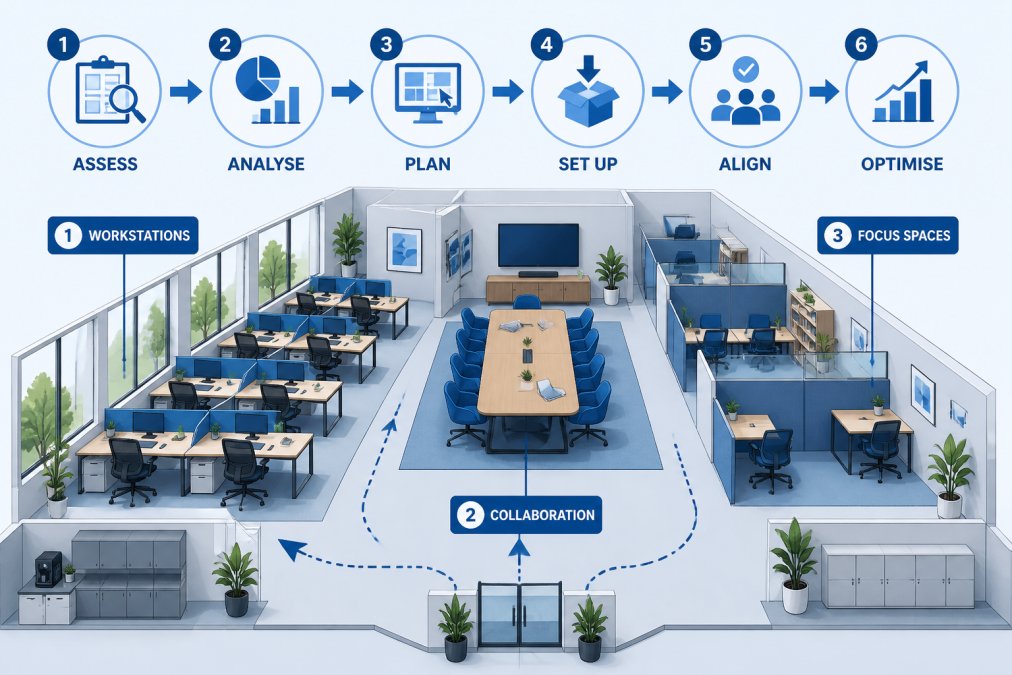
Test your layout on paper before moving furniture. Walk through it mentally. Does traffic flow smoothly? Are high-traffic areas separate from focus zones? Does the layout support your team's actual work patterns?
Prepare Your Office Setup Checklist
A structured checklist prevents forgotten tasks and reduces stress during your post-move office setup. Break the checklist into phases: immediate priorities, secondary tasks, and final touches.
Essential items to prioritise first
Get these done before staff arrive on day one:
- Test all internet connections and Wi-Fi coverage
- Verify that phone systems work
- Set up reception area and signage
- Install basic furniture: desks, chairs, tables
- Set up kitchen facilities and toilets
- Confirm emergency exits are clear and marked
- Test lighting in all areas
- Set up IT equipment and servers
- Arrange parking or transport access
- Brief staff on building access procedures
These tasks directly affect staff safety and basic functionality. Without them, your office cannot operate.
Secondary setup tasks
Complete these within the first week:
- Organise storage and filing systems
- Hang artwork and signage
- Set up breakout and relaxation areas
- Install additional lighting if needed
- Arrange plants and decorative items
- Test all printers and equipment
- Set up meeting room technology
- Organise stationery and supplies
- Create staff directories and maps
- Review and brief staff on new office procedures
These tasks improve comfort and efficiency but aren't critical on day one. Spreading them across the first week prevents overwhelming your team.
Complete Office IT Setup After a Move
Your office cannot function without reliable technology. Post-move office setup includes thorough IT checks before staff work from the new location.
Test internet connectivity in every area. Run speed tests to confirm you're getting the bandwidth you pay for. Check Wi-Fi coverage in meeting rooms and break areas. Dead zones create frustration and reduce productivity.
Test connectivity and equipment
Before staff arrive, verify that all equipment works:
- Internet connection speed and stability
- Wi-Fi coverage across the entire office
- Phone system functionality
- Printer and scanner connectivity
- Server or cloud system access
- Video conferencing equipment
- Access control systems
Test from multiple locations. What works at your desk might not work in meeting rooms. Move around the office and check signal strength.
Verify that all staff can access the systems they need. Test login credentials. Confirm that file servers are accessible. Check email systems and collaboration tools.
Verify data security and backups
Confirm that your data security measures are active:
- Firewall is configured and running
- Antivirus software is installed and updated
- Backup systems are operational
- Access controls are properly set
- Security cameras are functioning (if applicable)
- Visitor Wi-Fi is separate from staff network
Test your backup systems. Verify that recent data has been backed up successfully. Document your backup schedule and recovery procedures.
According to the National Cyber Security Centre guidance on IT security, regular verification of security systems prevents breaches and data loss. Make this part of your standard post-move checklist.
Develop an Office Move Communication Plan
Clear communication prevents confusion and keeps your team confident during the transition. Your office move communication plan should cover timelines, expectations, and logistics.
Inform staff of timelines and expectations
Tell staff exactly what to expect:
- Moving date and time
- When the new office opens to staff
- Which staff work on which days during transition
- What they should bring on their first day
- Where to park or how to access the building
- Who to contact with questions or problems
Provide this information at least two weeks before the move. Answer questions early. Uncertainty creates anxiety and reduces productivity.
Share details about the new office layout. Tell staff where their desks are located. Explain how to access meeting rooms, toilets, and break areas. Reduce the learning curve on day one.
Confirm roles and responsibilities
Make clear who is responsible for what during and after the move:
- Who manages the removal company (usually your facilities team)
- Who oversees IT setup and testing
- Who handles staff communications
- Who coordinates the staggered return to the office
- Who manages any issues or problems that arise
- Who handles questions from staff
Assign a single point of contact for staff questions. This person should be available and responsive. They reduce confusion and keep the transition smooth.
Document these roles in writing. Share them with your team. Everyone should know who to contact for different issues.
Minimise Disruption During the Setup Phase
Your business doesn't stop just because you're moving. Plan how to maintain essential operations while your office setup is underway.
Stagger staff return dates
Don't bring everyone back on day one. Stagger the return over several days or weeks:
- Day 1-2: Essential staff only (IT, facilities, management)
- Day 3-5: First team groups
- Week 2: Remaining staff
- Week 3: Full occupancy
This approach allows you to test systems with fewer people. Problems get fixed before everyone arrives. Staff experience a less chaotic first day.
Prioritise teams that generate revenue or deliver critical services. Support functions can return later when systems are stable.
Maintain essential operations during transition
Keep your business running during the move:
- Set up remote working options for staff who can't access the new office yet
- Maintain phone and email access throughout the transition
- Keep customer-facing services operational
- Schedule the move during quieter business periods if possible
- Brief clients about any temporary service changes
- Ensure IT systems stay accessible during the transition
Plan your move to fit around your business cycle, not the other way around.
Have backup plans for critical functions. If your internet goes down, can staff work remotely? If a phone system fails, can you route calls elsewhere? These contingencies keep your business stable during the transition.
Complete Health and Safety Checks
Before declaring your office ready, complete a thorough health and safety review. This protects your staff and your business.
Walk through your entire office with a health and safety checklist. Look for:
- Adequate lighting in all areas
- Clear emergency exits and escape routes
- Accessible fire extinguishers and first aid kits
- Proper ventilation and temperature control
- Ergonomic workstations that reduce injury risk
- Secure storage of hazardous materials
- Clear signage for hazards and procedures
- Accessible facilities for disabled staff
- Proper cable management to prevent trips
- Secure furniture that won't tip over
Document any issues and fix them before staff arrive. Small problems now prevent accidents and injuries later.
Conduct a fire evacuation drill with staff once everyone is settled. Test your emergency procedures. Make sure everyone knows the assembly point and exit routes. Review your health and safety policy with your team.
Keep records of all your checks and improvements. This demonstrates due diligence if issues arise later. Review your records regularly and update your procedures as needed.
Moving your office is complex, but breaking it into clear steps makes it manageable. Get these steps right, and your team will be productive and confident in your new office. The Health and Safety Executive guidance on workplace health and safety provides detailed standards for office environments.
Frequently Asked Questions
What should you do first when setting up an office after a move?
Begin by assessing the physical space: check that utilities are operational, verify safety compliance, and measure the layout. Then unpack and position essential items, desks, chairs, IT equipment, before staff arrive. Conduct a thorough IT test to confirm connectivity and data integrity. A structured first-day focus prevents bottlenecks and allows your team to work productively from day one.
What should be included in a post-move office checklist?
Your office setup checklist should cover structural checks (lighting, heating, emergency exits), IT verification (internet, phones, servers), furniture placement, supplies (stationery, kitchen items), signage, and staff amenities. Divide tasks by priority: critical items first (IT, safety), then comfort items (kitchen, break areas). A tiered approach ensures nothing essential is overlooked while allowing flexibility if time is tight.
How long does it typically take to set up an office after a move?
Timeline depends on office size and complexity. Plan for IT setup to take longer than furniture placement. Building in a buffer week before staff fully return reduces stress and allows you to address unexpected issues.
What health and safety checks must be completed before staff return?
Verify fire exits are clear and signage is visible, test emergency lighting and alarms, confirm heating and ventilation systems work, check that electrical installations are safe, and ensure first aid kits are accessible. Review the Health and Safety at Work etc. Act 1974 requirements relevant to your premises. Document all checks in writing and address any issues before welcoming staff back.